
Did you know that you can clone your previous course to create your upcoming course?
After you put the time into creating your first cohort, you can then clone that course to create your upcoming course(s).
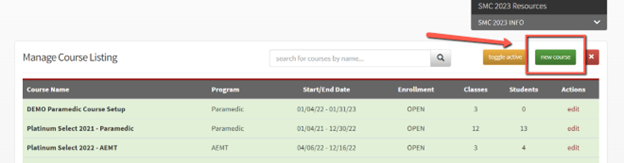
Select “new course” as you normally would:
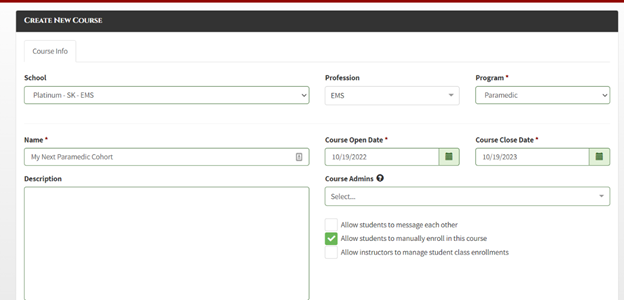
Choose your profession and program, name your new course, enter your course dates, assign Course Admins if desired, and select any additional options for your new course:
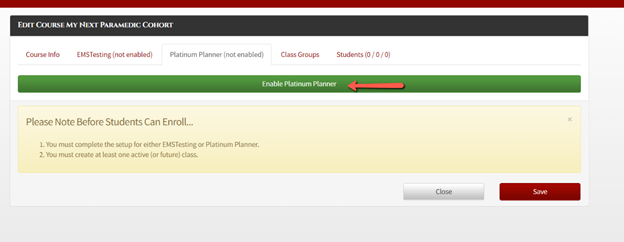
Enable the Platinum product that you want to use for the new course:
Then, instead of creating a course based on a template, select “clone an existing course”. You can then select the course that you want to clone.
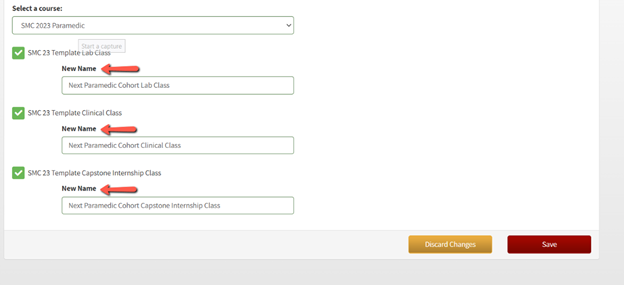
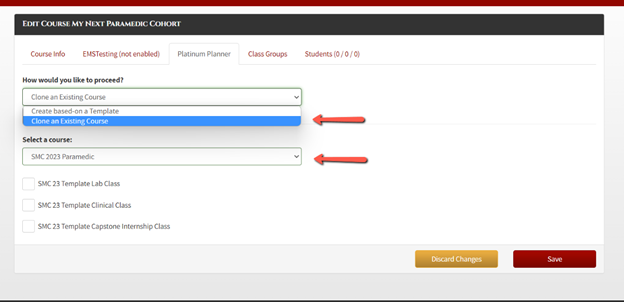 Once you select the course you want the clone, the classes in that course will populate and you can select the classes you want to clone in the new course and rename them if needed:
 You can then edit any of the course or class settings for the new course, including assigning new instructors.
If you have not set up your first course in Platinum, you can always schedule time with a trainer who can help you set up your course to meet your program’s requirements which also gives you an opportunity to ask any questions you may have.
To schedule time with a trainer, you can use the blue “Schedule Training” tab on your dashboard or you may also use this link here: https://app.acuityscheduling.com/schedule.php?owner=13498800&appointmentType=2875194